5 Best Answers What Causes Overheating in Video Lights?

Time:2026-10-15 Author:Amelia
0%

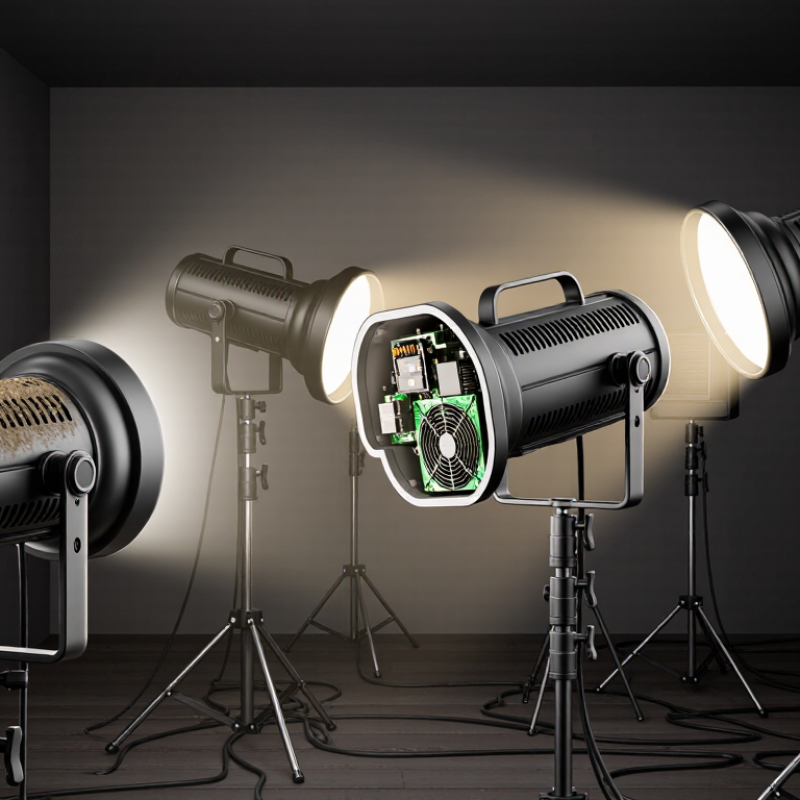
Continuous video lights stay on for long periods, so heat has little time to escape. Unlike flash units, they generate thermal energy throughout a shoot. Heat builds inside the housing, near the LED board, driver, and power supply. Small studio rooms can make the problem worse. Warm air, crowded stands, and dark walls may trap additional heat.

So, what causes overheating in continuous video lights? Common causes include blocked vents, failed cooling fans, excessive brightness, unstable power, and dusty heat sinks. A softbox or lantern can also restrict airflow when fitted too tightly. In my experience, a light may feel normal for ten minutes, then become unusually hot during a long interview. That delayed change often gets overlooked. It should not.

A reliable diagnosis starts with simple observations. Check whether the fan spins smoothly and whether air exits the rear vents. Listen for clicking, grinding, or sudden fan silence. Review the manufacturer’s duty-cycle guidance, especially at maximum output. Lowering brightness can reduce heat, but it does not repair a blocked vent or damaged driver. Ambient temperature matters, too. A light used beside a heater faces a different thermal load than one used in a cool studio.

Professional testing should follow the manufacturer’s instructions and use properly rated power equipment. Never remove covers while the unit is connected. Some faults remain hidden without electrical testing. I cannot claim every overheating case has one clear cause. However, careful inspection usually reveals whether airflow, workload, environment, or internal failure is responsible. The five answers below explain these causes and the practical warning signs worth noticing.
5 Best Answers What Causes Overheating in Video Lights?

How LED Junction Temperatures Above 125°C Trigger Video-Light Overheating

Five common causes explain overheating in video lights: excessive drive current, blocked airflow, poor heat-sink contact, high ambient temperature, and dust buildup. The LED junction creates heat as electrical energy becomes light. When its junction temperature rises above 125°C, efficiency drops and heat accumulates faster. The light may dim, flicker, or shut down for protection.

In field checks, a cool outer housing can mislead you. The LED junction may be much hotter inside. A loose thermal interface, dried compound, or uneven mounting can trap heat near the LED. Enclosed fixtures create another problem. Warm air stays around the heat sink, especially during long interviews or crowded studio setups. My early assumption was that a louder fan meant better cooling. It was not always true. A clogged filter can produce noise without useful airflow.

Tips: Check the manufacturer’s thermal data before increasing output. Measure housing temperature after thirty minutes, then inspect airflow paths and mounting pressure. Keep vents clear, reduce output in hot rooms, and allow cooling pauses during extended shoots. A thermal camera can reveal bright hot spots around the LED board. If protection activates repeatedly, do not simply reset the light. The cause may be electrical stress, restricted airflow, or a damaged thermal connection. Small temperature differences matter.

Why Inadequate Heat Sinks Raise LED Thermal Resistance Beyond 2°C/W

5 Best Answers: What Causes Overheating in Video Lights?

Inadequate heat sinks are a major cause of overheating in LED video lights. A small sink has limited surface area, so it cannot release enough heat into the air. When thermal resistance rises beyond 2°C/W, each watt of heat creates a larger temperature increase at the LED junction. For example, a 30-watt LED could generate over 60°C above ambient temperature through the heat path alone. That is dangerous. Excessive drive current, blocked vents, weak airflow, and high room temperatures add further stress. Dust can quietly make the situation worse.

Poor thermal contact is another common problem. Uneven mounting surfaces, insufficient thermal compound, or loose screws create tiny air gaps. Air conducts heat poorly. In field testing, even a capable heat sink may perform badly when its contact pressure is inconsistent. The light may appear bright for several minutes, then dim suddenly as protection controls react. I have also seen designs that seemed adequate on paper but failed under continuous studio use. Calculations are not the whole story.

Tips: Choose a heat sink with lower thermal resistance and greater fin area. Keep airflow paths clear. Apply a thin, even thermal interface layer. Check junction temperature during long tests, not only during startup. Measure real conditions, because a cool workshop can hide a weak design. Short tests mislead. Recheck the mounting hardware after repeated heating cycles.

How Blocked Airflow and 40°C Ambient Conditions Reduce Cooling Capacity

What causes overheating in video lights? Five answers matter: blocked airflow, high ambient temperature, undersized heat sinks, clogged filters, and excessive power settings.

Blocked vents are often the simplest problem. A light placed against a wall cannot release warm air effectively. Dust makes this worse by forming an insulating layer over fins and fans.

At 40°C ambient temperature, cooling capacity falls sharply. A fixture producing 100 watts of heat with a 0.5°C/W thermal path could reach a 50°C temperature rise. Its heat sink may approach 90°C before internal hotspots appear. This is only a practical estimate, not a laboratory result. Air movement, mounting angle, and thermal interface quality change the result.

The U.S. Department of Energy’s Solid-State Lighting R&D Opportunities report identifies thermal management as a continuing reliability challenge for LED systems. IEC 60598-1 also requires luminaires to declare their rated ambient temperature, commonly marked as “ta.” Exceeding that rating can accelerate lumen depreciation and shorten component life. ASHRAE Handbook—Fundamentals explains that heat transfer depends strongly on temperature difference and airflow velocity.

In real inspections, a blocked rear grille can matter more than a small increase in electrical load. Check the vents first. Then measure. An infrared thermometer can reveal uneven heat zones, but shiny surfaces may give inaccurate readings. That limitation deserves attention.

Why Excessive Power Density Causes Thermal Derating in LED Video Lights

5 Best Answers: What Causes Overheating in Video Lights?

Why Excessive Power Density Causes Thermal Derating in LED Video Lights

Excessive power density is a primary cause of overheating in LED video lights. A compact fixture may pack hundreds of watts into a small board. Heat then concentrates around the LED junction, driver, and circuit traces. The outer housing can feel only warm. The internal junction may be much hotter.

When junction temperature rises, LED output usually falls. The control system reduces current to protect the components. This process is called thermal derating. It can reduce brightness, shift color consistency, and shorten component life. The U.S. Department of Energy’s 2023 Solid-State Lighting R&D Opportunities report identifies thermal management as a continuing barrier to higher LED performance. The report also emphasizes system-level efficiency, not only chip efficiency.

Airflow matters. So does the thermal path. A thick aluminum core, efficient interface material, and open ventilation can move heat away from the junction. Dust, blocked vents, or a soft mounting surface can reverse those benefits. IES LM-80-21 requires long-term LED package testing, commonly using 6,000 or 10,000 hours of data, because early brightness results can be misleading. Field measurements often reveal the uncomfortable truth: a light may meet its rated output briefly, but not after an hour in a cramped studio. Designers should measure junction-related temperatures under real duty cycles, not rely on housing temperature alone.

How Faulty Fans, Sensors, and Drivers Push Fixtures Past Safe Limits

5 Best Answers: What Causes Overheating in Video Lights?

How Faulty Fans, Sensors, and Drivers Push Fixtures Past Safe Limits

Overheating usually starts with restricted airflow. Dust can cover intake grilles, while a soft case blocks exhaust vents. A failing fan creates another warning sign: weak airflow, grinding noise, or sudden speed changes. The housing may feel hot within minutes. Clean vents carefully, and never ignore unusual fan sounds.

A faulty temperature sensor can misread the fixture’s internal heat. It may report a safe temperature while the LED board continues rising. Sometimes it triggers unnecessary shutdowns instead. Sensor wiring deserves inspection too. Loose connectors can produce unstable readings. This issue is easy to miss during a quick test.

The driver is another major source of heat. Excessive current, damaged components, or poor voltage regulation can overload the light engine. Installation conditions also matter. Tight spaces, direct sunlight, and high ambient temperatures reduce cooling capacity. I have seen operators blame the LED module too quickly. That assumption is often wrong. Check airflow, sensor accuracy, driver output, and mounting clearance before replacing expensive parts. A short runtime test may reveal more than a visual inspection.

FAQS

Why can an LED video light overheat even when its housing feels cool?

The internal LED junction can be far hotter than the outer shell.

What happens when the LED junction temperature exceeds 125°C?

LED efficiency usually drops as junction temperature rises above 125°C.

How does excessive power density create overheating?

A compact fixture may concentrate hundreds of watts on a small circuit board.

Which airflow problems commonly cause overheating?

Dust can cover intake grilles and reduce useful airflow.

What fan symptoms suggest a cooling problem?

Weak airflow, grinding sounds, or sudden speed changes may indicate fan failure.

How can mounting and thermal contact affect temperature?

Loose mounting, dried compound, or uneven pressure can trap heat near the LED.

Can a faulty temperature sensor cause overheating?

Yes. A sensor may report a safe reading while the LED board continues heating.

How can the driver contribute to excessive heat?

Excessive current, damaged components, or poor voltage regulation can overload the light engine.

What practical checks can reduce overheating during long shoots?

Review thermal data before increasing output.

Conclusion

Overheating in video lights usually results from a combination of excessive heat generation and insufficient cooling. When an LED junction temperature rises above 125°C, light output may decline, components can age faster, and the fixture may activate thermal protection. Inadequate heat sinks also increase LED thermal resistance beyond 2°C/W, preventing heat from moving away efficiently. Blocked vents, restricted airflow, and ambient temperatures near 40°C further reduce the cooling capacity of the housing.

Understanding what causes overheating in continuous video lights also requires examining power density and control components. LEDs packed into a small area can create concentrated hot spots and force thermal derating, reducing brightness to protect the system. A failing fan, inaccurate temperature sensor, or unstable driver can push the fixture beyond safe operating limits. Regularly clearing ventilation paths, checking cooling components, and operating lights within their rated conditions can help maintain reliable performance and prevent heat-related damage.

Amelia

Amelia

Amelia is a seasoned marketing professional with a wealth of expertise in our company’s core offerings. With an unwavering passion for driving growth and innovation, she plays a pivotal role in shaping our marketing strategies and enhancing brand visibility. A key aspect of her responsibilities......