How to Use TTL Flash for Better Event Photography?

Time:2026-10-05 Author:Sienna
0%

Event photography rarely gives you a second chance. A bride turns toward the aisle, a speaker steps beneath uneven lights, and the dance floor suddenly fills. In those moments, exposure must change quickly. That is why many photographers ask, “why is ttl mode better than manual flash for events?”

TTL, or Through-The-Lens metering, measures the scene and adjusts flash power automatically. It can respond when a subject moves closer, wears a dark jacket, or stands against a bright window. During a crowded reception, this flexibility can protect skin tones and preserve expressions. You can also use exposure compensation to make the flash brighter or softer without changing several settings.

David Hobby, founder of Strobist and a respected lighting educator, has said, “Manual flash is not hard.” His point matters. Manual flash often delivers greater consistency when distance and composition remain stable. TTL is not automatically superior. It is simply faster when conditions keep changing.

That distinction shapes this guide. We will examine why TTL mode can be better than manual flash for events, while recognizing its limits. TTL may misread reflective dresses, dark rooms, or unusual backgrounds. It can also produce different exposures between frames. That happened to me during a dim reception, where a white tablecloth confused the meter.

Small corrections matter.

The practical goal is not perfect automation. It is dependable light, faster reactions, and fewer missed moments. We will compare setup speed, consistency, exposure compensation, bounce flash, and real-world reliability. The best choice depends on the venue, subject movement, and your experience behind the camera.
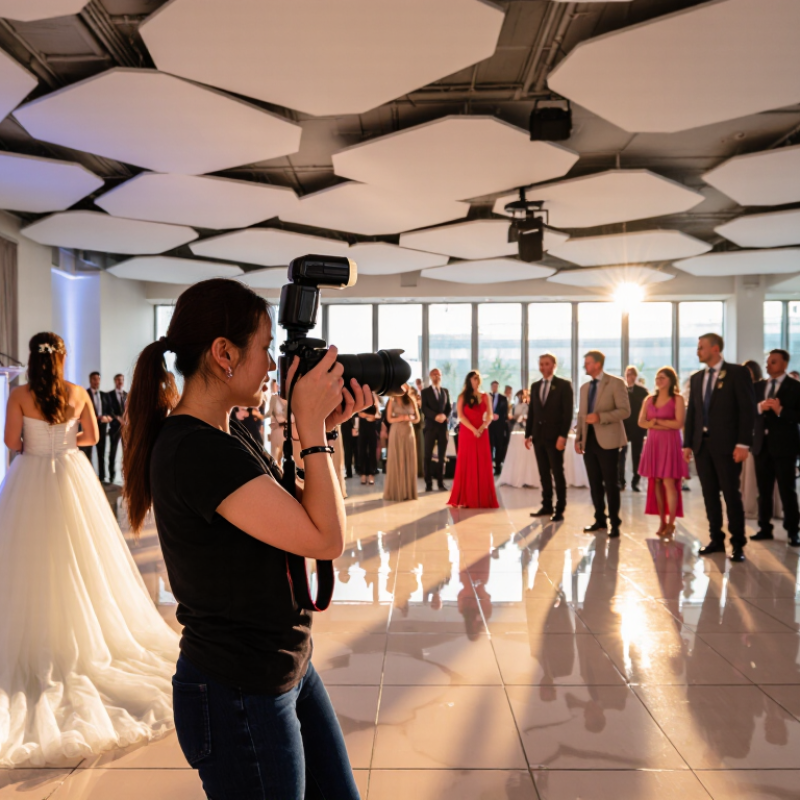
How to Use TTL Flash for Better Event Photography?

Understanding TTL Flash and Its Role in Event Photography

Understanding TTL Flash and Its Role in Event Photography

TTL flash means Through-The-Lens metering. Before the main burst, the flash sends a brief pre-flash. The camera measures reflected light and adjusts output automatically. This matters when guests move between a bright stage and a dim reception hall. CIPA’s 2023 statistical report recorded about 5.79 million interchangeable-lens cameras shipped worldwide. That scale reflects continuing demand for flexible, responsive camera systems. TTL supports that flexibility, especially during fast-changing events. It is not magic.

During a wedding entrance, I may set the camera to manual exposure and leave TTL flash active. I then adjust flash exposure compensation, often between minus one and plus one stop. Faces stay natural while background lights remain visible. A white dress can fool the meter. So can a dark suit. I still check the histogram and skin highlights between moments. Sometimes TTL underexposes a group. That mistake is useful feedback, not a disaster. I learn the room’s surfaces and anticipate the next frame.

The U.S. Bureau of Labor Statistics projects photographer employment to grow four percent from 2022 to 2032. Its Occupational Outlook Handbook also describes irregular schedules and deadline-driven assignments. Event photographers therefore need speed without abandoning judgment. Bounce flash from a low, neutral ceiling can soften shadows, but colored ceilings may stain skin tones. Direct flash is harsher, yet sometimes more reliable outdoors. Practice these choices before the event. Live testing is expensive.

Preparing Your Camera and Flash for TTL Operation

Preparing your camera and flash correctly makes TTL photography more predictable. Charge fresh batteries and clean the communication contacts gently. Mount the flash securely before switching it on. Then set the flash to TTL mode and confirm the camera recognizes it. A loose connection can produce manual-looking results.

Choose aperture priority or manual exposure, depending on the room and your subject. For indoor events, I often begin around 1/125 second, f/3.5, and a moderate ISO. Keep the shutter speed within the camera’s normal flash synchronization range. Point the flash head toward a nearby pale ceiling when possible. Direct light can look harsh. White balance should match the room, although raw files allow useful correction later.

Take a test frame with a person standing where the action will happen. Check the face, background brightness, and catchlights in the eyes. Use flash exposure compensation when TTL makes the subject too bright or too dark. Small changes matter, especially with reflective clothing. I still occasionally trust the preview too much in a dim venue. That is a mistake. Review the histogram and highlights instead. Recheck the batteries, flash angle, and exposure after moving between rooms, because dark walls and high ceilings can change the result quickly.

How to Use TTL Flash for Better Event Photography? - Preparing Your Camera and Flash for TTL Operation

Step Preparation Dimension Recommended Starting Point What to Do for TTL Operation What to Check
1 Camera exposure mode Manual exposure mode Set the aperture and shutter speed manually so the ambient-light exposure remains consistent while TTL controls the flash output. Confirm that the exposure does not change unexpectedly between frames.
2 Shutter speed Approximately 1/125 to 1/200 second Choose a shutter speed that freezes normal event movement while staying within the camera's standard flash-synchronization range. Verify the frame has no dark band caused by exceeding the normal synchronization limit.
3 Aperture Approximately f/2.8 to f/5.6 Use a wider aperture for subject isolation or a smaller aperture when several people must remain sharp. Remember that aperture affects both ambient exposure and required flash power. Check depth of field and whether the flash has enough power for the selected aperture.
4 ISO sensitivity ISO 400 to ISO 1600, depending on the venue Raise ISO when the room is dark or when you want more background detail and longer flash-battery life. Keep ISO lower when ambient light is already strong. Inspect shadows and darker areas for excessive noise.
5 Flash mode TTL or automatic through-the-lens metering Enable TTL so the camera and flash can measure the scene and adjust flash output for each exposure. Take a test frame and confirm that the flash fires and the subject is properly illuminated.
6 Flash exposure compensation 0 EV as the initial setting Reduce flash exposure compensation when faces look too bright, or increase it when the subject appears too dark against a bright background. Judge skin tones and highlights rather than relying only on the rear screen.
7 Flash direction Bounce from a nearby neutral, light-colored surface Angle the flash toward a ceiling or wall when the surface is close enough and suitable for bouncing. This creates softer, more natural-looking light than direct flash. Avoid strongly colored surfaces that can tint the subject.
8 Direct-flash fallback Use direct flash when bounce is impractical Aim the flash toward the subject when ceilings are too high, surfaces are too dark, or movement requires a predictable light path. Keep the light slightly softened if possible. Watch for harsh shadows, bright foreheads, and distracting background shadows.
9 Flash zoom or coverage Auto zoom or coverage matched to the lens angle Use a coverage angle that illuminates the frame without wasting power outside the composition. A wider setting may be needed for group portraits. Look for dark corners, especially with wide-angle lenses.
10 White balance Flash or a fixed temperature setting Use a consistent white-balance setting when flash is the main light. If ambient lighting has a strong color, consider matching the flash with a suitable color filter. Compare skin tones under different parts of the venue lighting.
11 Focus and drive mode Continuous autofocus and continuous shooting when needed Use continuous autofocus for moving guests and short bursts for important moments, while allowing the flash enough time to recycle between exposures. Confirm focus remains on the subject's face or nearest eye.
12 Flash recycle and battery readiness Fully charged batteries and spare power available Install fresh or fully charged batteries, reduce unnecessary full-power flashes, and pause briefly when the recycle indicator is not ready. Check the ready light and keep spare batteries accessible.
13 Test exposure Test against a person at the actual shooting distance Photograph a volunteer from the expected distance and review brightness, background detail, shadows, and color before the event begins. Make adjustments before important moments occur.
14 High-speed synchronization Use only when a faster shutter speed is necessary Enable high-speed synchronization for bright conditions or wide-aperture portraits that require a shutter speed above the normal synchronization limit. Expect reduced effective flash range and monitor battery consumption.
15 Final event check Review settings, memory, power, and flash connection Confirm TTL mode, exposure settings, flash compensation, focus mode, memory-card capacity, battery level, and secure mounting before shooting. Capture one final test image and inspect the histogram or highlight warning.

Note: These settings are practical starting points rather than fixed rules. Adjust them according to the venue, subject distance, ambient light, flash power, and the desired balance between the subject and background.

Choosing Reliable TTL Settings for Different Event Scenes

How to Use TTL Flash for Better Event Photography?

Choosing reliable TTL settings starts with reading the scene, not trusting automation blindly. In a crowded reception hall, begin around ISO 800, 1/125 second, and f/2.8. Use TTL with flash exposure compensation between -0.7 and 0 EV. This keeps faces bright while preserving warm background lights. CIPA’s 2024 camera shipment statistics recorded more than eight million digital-camera shipments worldwide, showing how widely adaptable exposure systems are used. Still, technology cannot replace observation.

For speeches near a white wall, aim the flash upward and reduce compensation to -1 EV. The ceiling becomes a soft reflector. In a dark dance floor, direct TTL light can freeze movement at 1/160 second, but shiny clothing may confuse the meter. Check the histogram after three frames. Small corrections matter. I often lower flash power when guests wear pale colors, though this is not always enough. A mixed-color venue can fool TTL badly.

During outdoor ceremonies, set ISO 100–400 and use high-speed synchronization when the shutter exceeds the camera’s normal sync limit. Keep the subject within practical flash range. The 2024 Global Wedding Report from The Knot found that couples continue investing heavily in professional photography, increasing pressure for consistent results across changing scenes. Test before guests arrive. Review skin tones, shadows, and motion. Reliable TTL is a starting point, not a guarantee.

Balancing Flash Output with Ambient Event Lighting

How to Use TTL Flash for Better Event Photography?

Balancing flash output with ambient event lighting starts with reading the room. Before shooting, I check the ceiling, wall colors, and strongest light sources. A TTL flash can adjust output quickly when guests move between tables. However, automatic exposure is not always consistent. Dark clothing may make the flash work too hard, while pale backgrounds can reduce its output.

I usually set the camera to preserve the atmosphere first. A moderate shutter speed keeps movement natural, while a wider aperture records dim decorations and warm lamps. I then use flash exposure compensation to make faces slightly brighter than the background. Small adjustments matter. At a crowded reception, minus one stop often looks more believable than full power. I also turn the flash head toward a nearby neutral wall when possible. Direct light can flatten expressions and create sharp shadows behind guests.

Watch the highlights.

Review the first few frames. Skin may look correct on the camera screen but appear too bright later. I have also trusted TTL in changing light and lost consistency across a short sequence. That mistake taught me to lock exposure when the lighting becomes stable. If the room changes again, I reset carefully instead of assuming the previous setting still works. Keep checking the background, not only the subject. A beautiful face with a black, empty room can weaken the entire event photograph.

Refining TTL Results Through Composition and Exposure Checks

TTL flash can make event photography faster, but automation does not replace careful observation. In crowded rooms, I watch the background before pressing the shutter. A bright wall may fool the meter and produce a dark subject. A white dress can also lose detail when flash output rises too much. Check the histogram after a few frames. Look at faces, clothing, and reflective surfaces.

Composition changes how TTL behaves. I often move closer instead of increasing flash power across a large room. This keeps the subject clearer and reduces harsh shadows behind them. Turning the camera slightly can place distracting highlights outside the frame. Leave enough space for movement, especially during dances or speeches. Small adjustments matter.

Exposure checks should continue when the lighting changes. A doorway, colored stage light, or window can alter the result within seconds. I usually compare one test frame with the actual scene, then adjust flash compensation in small steps. Lower compensation may protect pale skin; positive compensation can help against a dark background. Still, I sometimes react too late and miss a natural expression. That failure reminds me to check the next frame, not trust the previous one. TTL is useful, but composition and review make its decisions dependable.

FAQS

What does TTL flash mean?

TTL means Through-The-Lens metering. A brief pre-flash measures reflected light before the main burst. The camera then adjusts flash output automatically.

Why is TTL flash useful at events?

Event lighting can change quickly between bright stages and dark reception rooms. TTL responds as guests move between these areas. It saves time, but it is not magic.

Can TTL flash work with manual camera exposure?

Yes. You can set the camera manually while leaving flash output automatic. This helps preserve warm lamps, decorations, and darker backgrounds.

How can I keep faces natural with TTL flash?

Use flash exposure compensation to control brightness. A range near minus one to plus one stop can be useful. Slightly lowering flash output often looks more natural.

Why can TTL flash expose groups incorrectly?

White dresses, dark suits, and pale walls can confuse the meter. A bright dress may cause underexposure. A dark suit may make the flash work too hard. Check the histogram and skin highlights.

Should I bounce the flash during indoor events?

Bounce light from a low, neutral ceiling or nearby wall when possible. This softens shadows and reduces flat-looking faces. Colored ceilings may add unwanted color to skin. I sometimes trust the ceiling too much.

Is direct flash ever a better choice?

Yes. Direct flash can be harsher, but it may be more reliable outdoors. Use it when there is no suitable surface for bouncing. Watch for sharp shadows behind people.

How should I balance flash with ambient light?

Preserve the room atmosphere before increasing flash power. Use a moderate shutter speed for natural movement. A wider aperture can record dim lamps and decorations. Keep the background visible, not completely black.

How can I improve TTL consistency during a short sequence?

Review the first few frames carefully. If lighting becomes stable, lock exposure instead of relying entirely on TTL. Reset when the room changes again. I have lost consistency by assuming one setting would always work.

What should I practice before photographing an event?

Test bounce angles, direct flash, compensation, and camera exposure beforehand. Use rooms with different ceilings and wall colors. Practice matters because live testing is expensive. Mistakes still happen. Review them honestly.

Conclusion

TTL flash can make event photography more efficient by automatically measuring the scene and adjusting flash output for changing distances, subjects, and lighting conditions. Before shooting, enable TTL mode, confirm that the flash communicates properly with the camera, charge the batteries, and test exposure in the actual venue. Select a practical starting point, then adjust flash compensation when faces appear too bright or too dark. This explains why is ttl mode better than manual flash for events: it reduces the need for constant power calculations while people and conditions are moving.

For consistent results, balance flash with ambient light instead of overpowering the atmosphere. Use a moderate shutter speed, suitable aperture, and ISO to preserve background details, while allowing TTL to illuminate the main subject naturally. Review highlights, shadows, skin tones, and composition after important moments, then refine compensation or camera settings as needed. With thoughtful positioning and regular exposure checks, TTL flash can support spontaneous, well-balanced images throughout a busy event.

Sienna

Sienna

Sienna is a skilled marketing professional with a deep expertise in our company’s core products and services. With a passion for innovation and detail, she plays a pivotal role in crafting insightful blog posts that not only highlight the unique features of our offerings but also provide valuable......